Frequently asked questions (FAQ)
Everything you need to know about the Pass G7
General Information
The Pass G7 is a personal digital access pass (QR code), issued by the Haute-Savoie Prefecture, required to enter the security perimeters surrounding the venues of the 2026 G7 Summit in Evian-les-Bains.
In many situations, a Pass G7 is not required.
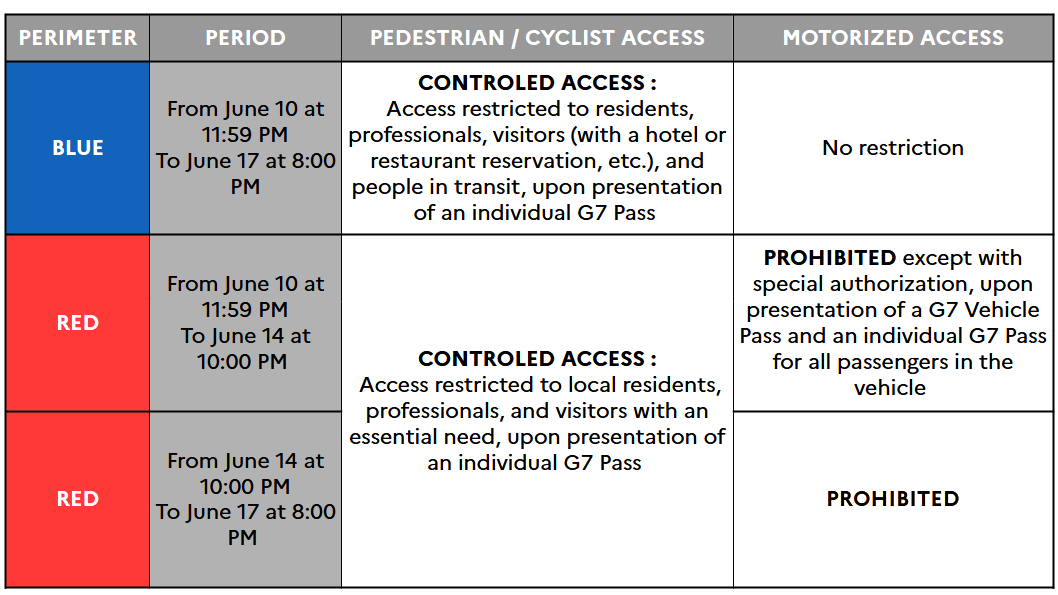
You will need an Individual Pass G7 to access the Blue Zone or the Red Zone on foot, by bicycle, or by scooter, from June 10 to 17, 2026.
If you are using a motorized vehicle (car, motorcycle, etc.), you will need a Individual Pass G7 AND, in addition, a Vehicle Pass G7 to access the Red Zone, from June 10 to 17, 2026.
If you wish to travel by vehicle within the Blue Zone, you do not need a Vehicle Pass G7. However, an Individual Pass G7 will be required for the driver and all passengers over the age of 13.
Yes, the Pass G7 is free of charge. Any website stating otherwise is not an official source for the Pass G7.
The Pass G7 is personal and non-transferable. You will be asked to present a valid ID when law enforcement checks your pass.
Pass G7 applications are reviewed individually by our services.
Pass G7 will be sent out once your application has been validated.
If you register after Sunday, June 7, we cannot guarantee that you will receive your Pass G7 in time due to processing times. Early application is strongly recommended.
If you have already submitted an application (please check that you received the application confirmation email), please do not resubmit your request.
To access the perimeters, you can present your Pass G7 on your mobile phone.
You also have the option to print it and present a printed copy.
Several security perimeters have been established:
The Blue Zone:
Covers the entire municipal area of Evian-les-Bains and parts of the municipalities of Neuvecelle, Publier, Maxilly-sur-Léman, Saint-Paul-en-Chablais and Larringes.
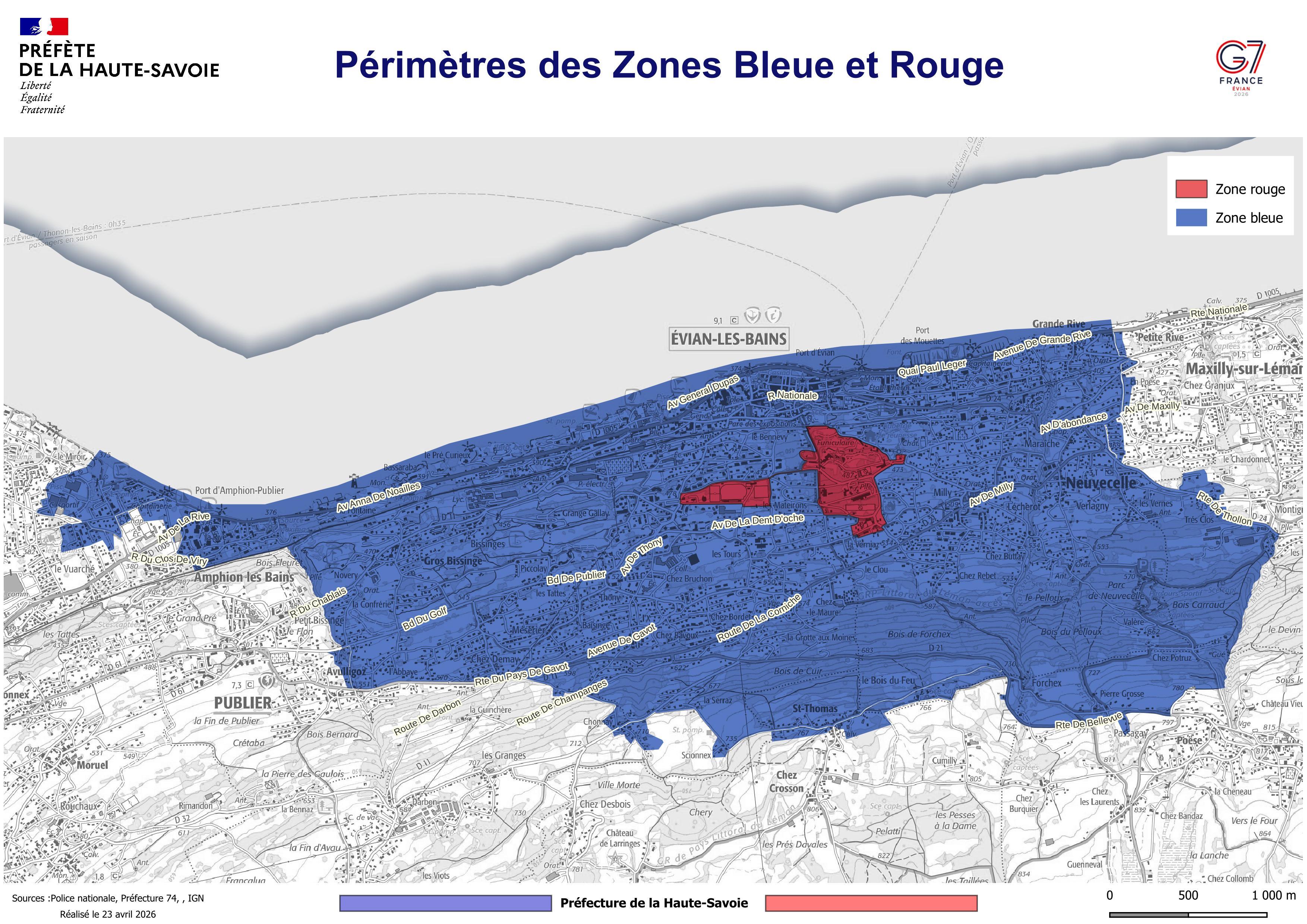
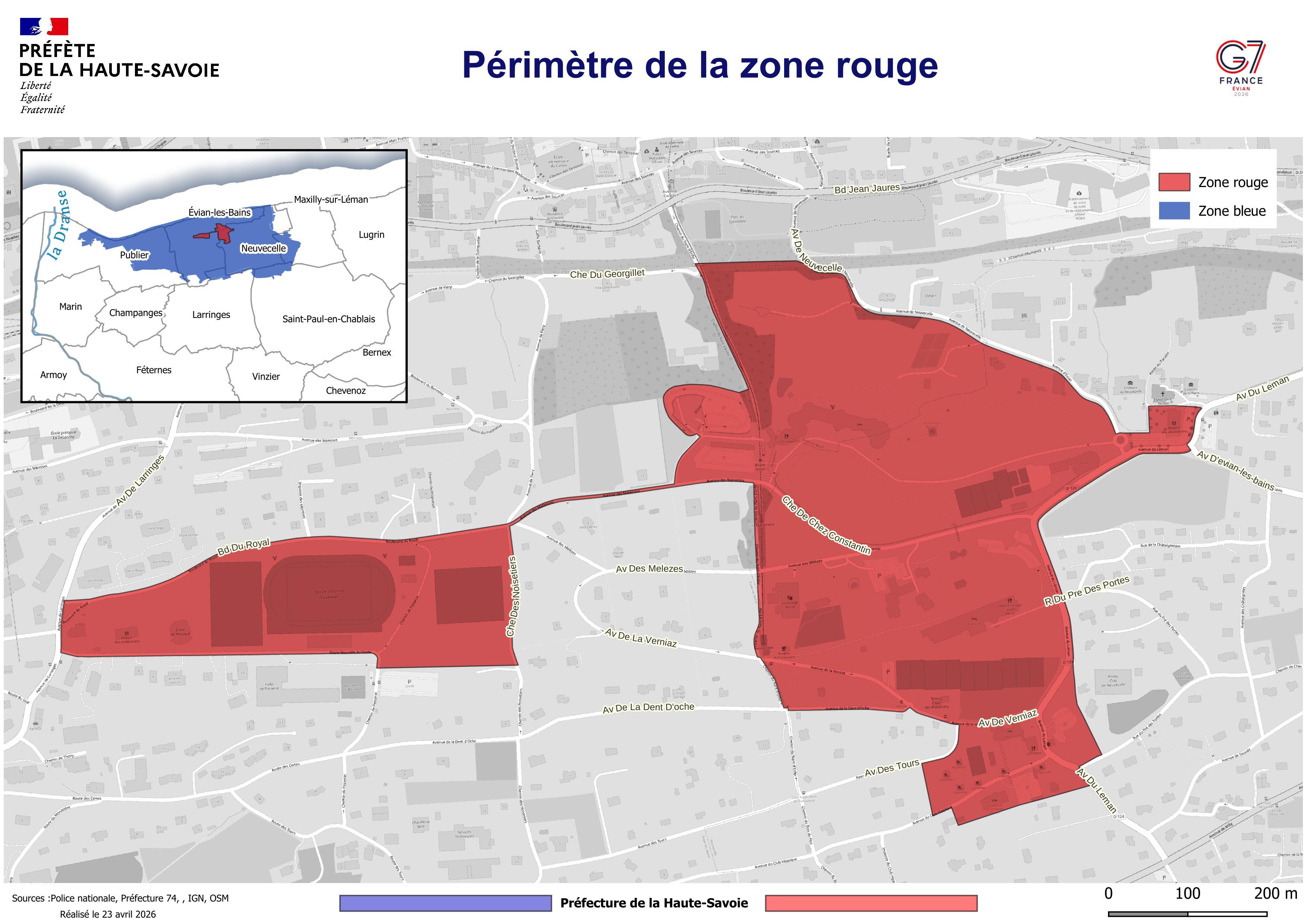
The Red Zone:
Located within Evian-les-Bains, including the following streets:
- Boulevard du Royal – 74500 Évian-les-Bains
- Avenue des Mateirons – 74500 Évian-les-Bains
- Chemin de Chez Constantin – 74500 Évian-les-Bains
- Chemin du Nant d’Enfer – 74500 Évian-les-Bains
- Place de l’Église – 74500 Neuvecelle
- Avenue du Léman – 74500 Neuvecelle
- Avenue du Club hippique – 74500 Neuvecelle
- Avenue de la Verniaz – partially on Evian, and partially on Neuvecelle
- Avenue de la Dent d’Oche – partially on Evian, and partially on Neuvecelle
- Chemin des Noisetiers – 74500 Évian-les-Bains
- Chemin de Passerat – 74500 Évian-les-Bains
- Nouvelle route du Stade – 74500 Évian-les-Bains
When you apply for your Pass G7, you can choose between an Individual Pass G7 (for a person) or a Vehicle Pass G7.
If you have applied for the Red Zone, you do not need to apply for a separate Individual Pass for the Blue Zone; your pass is valid for both perimeters.
There is no need to submit multiple Individual Pass applications. If you are both a resident and a professional, simply submit one application and provide the supporting documents for each relevant profile.
Pass G7 Eligibility
Pass processing is not automatic, and processing times may vary depending on the number of passes requested.
For any request submitted after June 7th, processing times may not allow for receipt of the pass before the activation of security checks (June 10th at 11:59 PM).
You will receive a response as soon as possible once your request has been processed.
In the meantime, please do not submit your request again.
Applicants will first receive a confirmation of receipt once the request is submitted.
Pass G7 applications are reviewed individually by our services. If you have already submitted an application (please check that you received the application confirmation email), please do not resubmit your request.
Each beneficiary (pass holder) listed in the application will then receive a validation confirmation or, if applicable, a request for any missing information needed to process the file.
Your Pass G7 will be sent via email once your application has been officially approved.
If you register after Sunday, June 7, we cannot guarantee that you will receive your Pass G7 in time due to processing times. Early application is strongly recommended.
During registration, you will be asked to provide personal details, including:
- First and last name
- Date and place of birth
- Email address
- Phone number
- Residential address
- Passport-sized photo
- Copy of a valid identity document (front and back sides), or one that has expired within the last 5 years.
For Vehicle Pass applications, depending on your request type, you must provide:
- License plate number
- Copy of vehicle registration certificate
- For professional vehicle: employer certificate issued within the last 3 months
In addition, depending on the reason for your visit, you will need to upload supporting documents.
Here is a list of accepted documents:
Proof of Residence:
- Utility bills (landline, internet, gas, or electricity) issued within the last 3 months
- Valid insurance certificate.
- Property deed, rent receipt, or lease agreement.
Proof of Temporary Accommodation:
- Booking confirmation (hotel, B&B, short-term rental platforms, etc.) specifying the dates of the stay.
- Sworn statement if staying with a private host.
Download the Host Statement template here .
Proof of Employment:
- Employment contract, mission letter, healthcare contract, or employer certificate (issued within the last 3 months) mentioning the employer’s name and the work address within the perimeter.
- Professional ID card
You can find a template here .
Proof of Visit within the perimeter:
- Booking confirmation (museum, restaurant, show, etc.).
- Confirmation of a medical, administrative, or legal appointment.
- Sworn statement from the person you are visiting, if they reside within the zone,and their Proof of Residence.
You can find a template here .
Proof of Private Parking:
- Lease agreement or property deed extract.
- Certificate from the property management company
A professional is considered non-mobile if their place of work has a fixed address.
In all other situations (deliveries, travel, meetings, etc.), they are considered a mobile professional.
When applying for a mobile professional pass, please enter a potential service address within the security perimeter. The supporting document must be issued for this exact location.
You are a visitor if you intend to stop within the zone for a specific reason, such as visiting a museum, a restaurant reservation, or visiting a relative.
A person is in transit if they are only passing through the zone. They travel from point A (outside the Blue and Red zones) to point B (also outside the Blue and Red zones) without stopping. You will be asked to specify your municipalities of origin and destination during the application process.
(Example: “I am traveling from Thonon-les-Bains to Lugrin without stopping in Evian.”)
Information regarding the application forms
Verify if you need a pass:
Visit the “Do I need a Pass G7?” page to check your eligibility.
Prepare your documents:
Gather all your supporting documents before starting.
Complete the form:
Fill in all required information and upload your documents. Once finished, you will receive a confirmation email.
The application process consists of four steps:
- Verification of address eligibility on the interactive map
- Selecting the Pass G7 type (Individual or Vehicle)
- Filling out the form
- Confirming the request
You must complete all three steps for your application to be processed. You will receive an email confirmation once your application is complete.
You have 60 minutes to complete the form. After this time, the session will expire, and you will need to start over. We strongly recommend gathering all your supporting documents before starting your application. Incomplete applications will not be saved; if you exit before finishing, you must restart the process.
Yes. An applicant can submit a request for other people (the pass holders). Each application is limited to 15 pass holders. If you need to register more than 15 people, you may submit multiple applications.
File types: .jpeg, .png, or .pdf.
Maximum file size: 5 MB.
Format: Standard passport-style photo.
Background: Light-colored and plain.
Quality: Sharp and clear (no blur), individual photo (no other people).
Lighting: No overexposure or underexposure; color photos are recommended.
Filters: No filters allowed.
Head: Must be bare (no hats, caps, or headbands).
Eyes: Visible and open, no sunglasses.
If you are applying via smartphone, you can take a photo directly within the form.
Every effort has been made to ensure the accessibility of the form. You can apply for a Pass G7 using a computer, smartphone, or tablet.
The municipality of Évian-les-Bains has set up a support system to help you with your application; please contact your local municipal services for assistance.
Starting June 11, 2026, the Haute-Savoie prefecture will also be setting up physical reception points to assist you with your application.
- Maison des associations – 791 avenue de la Rive, 74500 Publier
- Maison des associations – 146 route Nationale, 74500 Maxilly-sur-Léman
We encourage you to ask a relative or friend for assistance.
The municipality of Évian-les-Bains has set up a support system to help you with your application; please contact your local municipal services for assistance.
Starting June 11, 2026, the Haute-Savoie prefecture will also be setting up physical reception points to assist you with your application.
- Maison des associations – 791 avenue de la Rive, 74500 Publier
- Maison des associations – 146 route Nationale, 74500 Maxilly-sur-Léman
The form can only be open on one webpage at a time. If you see this message, click “Resume on this tab” to return to the form. If you need to submit multiple applications, you must complete them one after the other.
During periods of high traffic, you may be redirected to a waiting queue. If this happens, please do not refresh your page; the form will load automatically once it is your turn.
Please check your internet connection or try using a different browser. Remember that you cannot open the Pass G7 platform on two tabs at the same time in the same browser.
Postal address entry is automated; start typing your address and select it from the dropdown menu. If your address does not appear in the menu, a manual entry field is available directly below. Use this field to enter your address details.
If your file is too large, you can reduce its size by resizing or compressing it using a free online tool. As a reminder, the maximum file size is 5 MB.
If you need to merge two PDF files into one, various free online tools are available for this purpose.
If an error message appears, the reason and the necessary steps to resolve it will be displayed. Please read all instructions carefully and follow the indicated procedure.
As an applicant, you should receive a confirmation email after each submission. Please check your spam or junk folder, and review your inbox settings to ensure our emails are authorized. If you have not received a confirmation after 24 hours, you may contact support via the contact form.
Other questions
For any questions regarding the G7 Summit 2026 security perimeters, or if you are unsure whether you need to apply for a pass, please contact the following number: +33 1 86 65 24 21.
You can also find useful, regularly updated information on:
- The official G7 Summit website: https://www.elysee.fr/G7evian
- The Haute-Savoie Prefecture website: https://www.haute-savoie.gouv.fr
If you are encountering a technical issue (error message), you can call +33 1 86 65 24 21 or send us an email at the following address : support@pass-g7.gouv.fr .